
VA Portal Access Set Up- New User
VA Lender ID # & Pin: Request from passwords@fairwaymc.com
- Go to: https://vip.vba.va.gov
- Click on User Registration on the left-hand side of the page
- A Welcome Screen will appear, click on “Register Now”
- Choose VA Affiliate, click Next
- On the “Personal Information” screen you will be required to enter your legal name, SSN, Date of Birth, and gender. Click Next to continue registration.
- On the “Contact Information” screen you will enter your Address, Telephone, E-mail address. Click Next to continue registration.
- On the “Login/Security Information” screen please enter a unique Logon ID/Username*, a password* and complete the security questions. Click Next to continue registration.
User Name Rules:
1. Must not include any spaces.
2. Is NOT case sensitive.
Password Rules:
1. at least 8 characters in length.
2. must contain both upper and lower case letters.
3. must contain either a special character or a number.
4. must not be any common dictionary words.
5. must not include any spaces.
6. Is case sensitive.
* Make a copy of this Security Information page for your records*
ID and Password will not be emailed to you
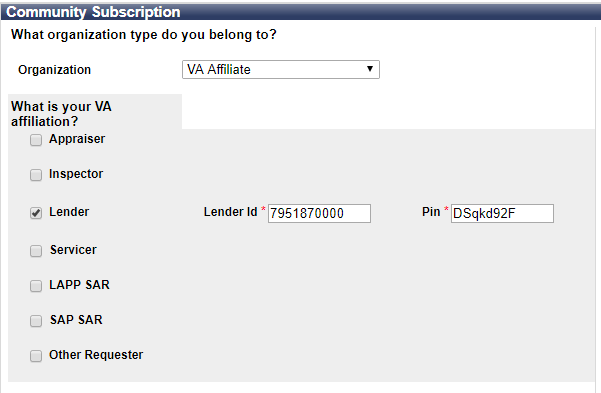
8. On the “Community Subscription” screen, you will choose “VA Affiliate” from the dropdown, then check Lender and enter in our Lender ID and Pin Number Listed above, then enter your business email address. Click Next to continue registration.
9.On the “Terms and Conditions” screen, please read Terms of Use and Rules of Behavior that apply to all users of the Veterans Information Portal, click the “I Accept” checkbox. Click Next to continue registration.
10. The Vendor Passwords team will be notified by VA once confirmed, we will then activate your account and send you a confirmation.
The system will assign the applications to your user id and give you a “successful” message and provide a login link on your screen.
VA Portal Access Set up- Current User
VA Lender ID # & Pin: Request from passwords@fairwaymc.com
- Go to:
- Log into your current account
- Click on my profile
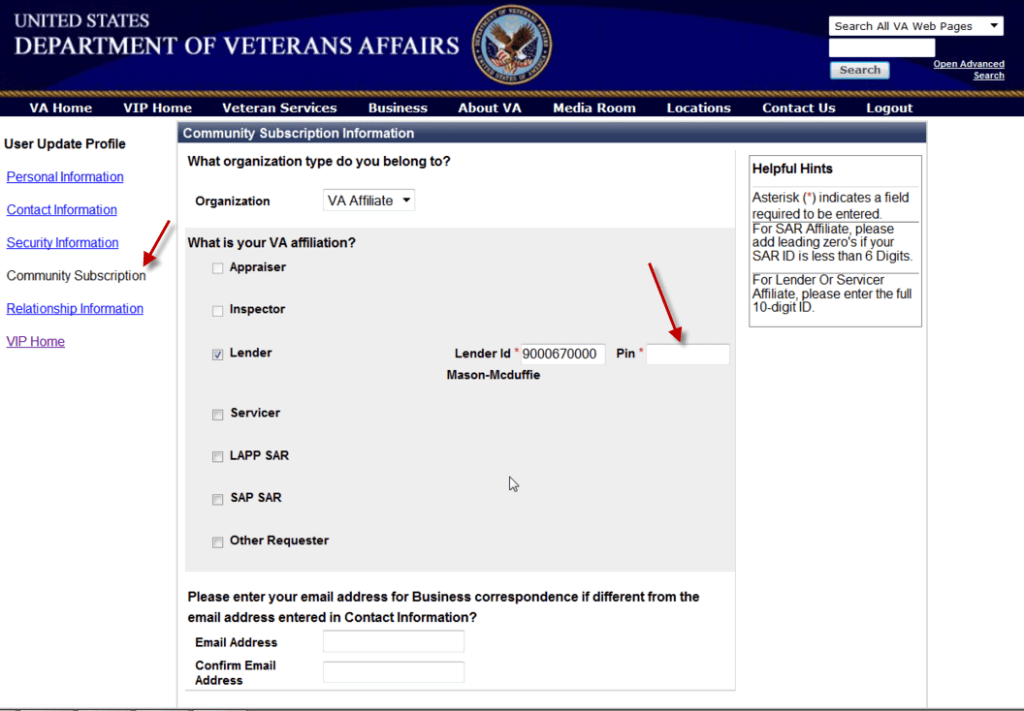
- Click on the “Community Subscription” screen, you will choose “VA Affiliate” from the dropdown, then check Lender and enter in our Lender ID and Pin Number Listed above, then enter your business email address. Click Next to continue registration.
- On the “Terms and Conditions” screen, please read Terms of Use and Rules of Behavior that apply to all users of the Veterans Information Portal, click the “I Accept” checkbox. Click Next to continue registration.
- The Vendor Passwords team will be notified by VA once confirmed, we will then activate your account and send you a confirmation.
 Site Title